PAN Network: Learn How Your Personal Devices Connect
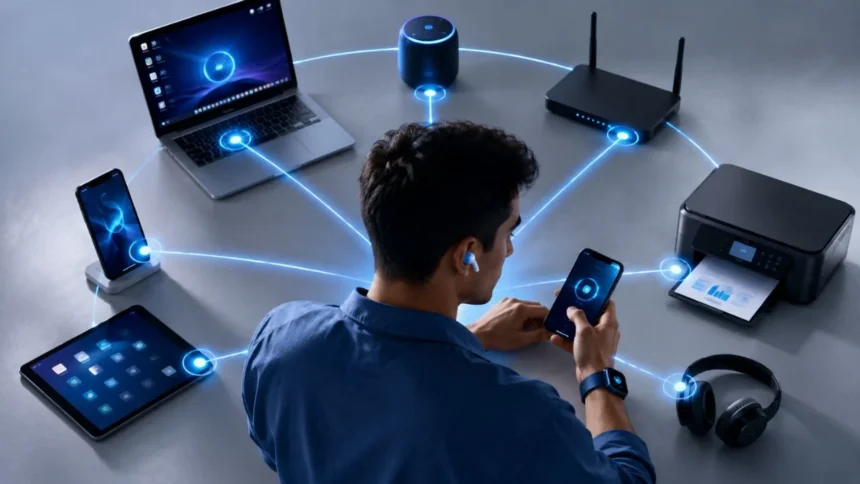
A PAN network creates a small communication area around one person and their electronic devices. It allows nearby equipment such as smartphones, laptops, smartwatches, keyboards, headphones and health sensors to exchange information without requiring a large business or home network.
PAN is the abbreviation for Personal Area Network. Unlike a local area network that may cover a house, office or school, a personal network generally supports a limited number of devices within a much smaller space. The connection may use wireless signals or a physical cable.
People create personal networks every day without necessarily recognising the term. Connecting wireless earbuds to a phone, synchronising a smartwatch, sharing mobile data through Bluetooth or transferring information with NFC are all examples of communication within a personal device environment.
Understanding how a PAN works helps you choose the right connection method, protect private information and solve pairing problems. This guide explains the main PAN network types, technologies, benefits, limitations, security risks and practical setup steps in simple language.
What Is a PAN Network?
A PAN network is a small computer network designed to connect devices used by or located close to an individual. It normally operates within a limited personal workspace rather than across an entire building, city or country.
The connected devices may communicate directly with one another or use one central device as a controller or gateway. A smartphone, for example, may connect with earbuds, a smartwatch and a laptop while also sharing its mobile internet connection.
The National Institute of Standards and Technology describes a wireless personal area network as a short-range network that requires little or no infrastructure. It is usually designed for a small number of devices located in the same room.
A PAN can exist temporarily or remain active for a long period. A temporary example is sending one file between two phones, while a permanent arrangement may connect a fitness tracker with the same smartphone every day.
PAN Network Full Form
The full form of PAN network is Personal Area Network. The word “personal” indicates that the network is organised around one person or a small collection of devices rather than a large organisation or public communications system.
The term “area” refers to the limited physical space in which the devices operate. Although the exact distance depends on the technology, a PAN usually covers the space immediately surrounding a person, desk, room or personal workspace.
“Network” means that two or more devices can exchange data or share a resource. That resource might be an internet connection, an audio stream, a document, health information, keyboard input or commands sent to a smart-home device.
The definition becomes easier to remember when each word is considered separately. A PAN is simply a network connecting personal equipment across a small area, usually with limited setup and little supporting infrastructure.
How Does a PAN Network Work?
A personal area network begins when compatible devices identify each other and establish a connection. Wireless equipment may advertise its presence through radio signals, while wired devices recognise the connection after a cable is inserted.
The devices then agree on a communication method. Bluetooth products may complete a pairing process, NFC devices communicate after being brought very close together, and USB equipment exchanges information through a physical connection and supported software.
One device may act as the main controller. A phone can send music to headphones, receive measurements from a smartwatch and provide internet access to a laptop. In other cases, two devices exchange data directly without relying on a central router.
The connection continues until a device moves out of range, loses power, disables the relevant technology or ends the session. Previously paired equipment may reconnect automatically when it returns to range, provided that both devices remain authorised.
Types of PAN Network
The two main categories are wired PAN and wireless PAN. Both perform the same basic purpose of connecting nearby personal devices, but they use different transmission methods and offer different advantages.
A wired personal area network relies on a physical connection such as a USB cable. It may be used to transfer files, synchronise data, charge equipment or share an internet connection between a smartphone and computer.
A wireless personal area network, commonly called a WPAN, uses short-range radio communication instead of cables. Bluetooth, Bluetooth Low Energy, NFC and IEEE 802.15.4-based technologies are common examples used by personal and connected devices.
The best type depends on the task. Wired connections can provide consistency and physical control, while wireless connections offer mobility and convenience. Many modern devices support both options so users can choose according to speed, power and security needs.
Wired Personal Area Network
A wired PAN connects equipment through a cable or physical interface. A common example is attaching a smartphone to a laptop with USB to transfer photographs, back up files or share the phone’s mobile data connection.
The physical link usually creates a stable connection that is less affected by nearby radio interference. Wired communication can also be easier to control because an unauthorised device generally needs direct access to the cable or equipment.
Cables reduce mobility, however, and different products may require different ports, adapters or drivers. A damaged cable, dirty connector or unsupported USB mode can also prevent the devices from communicating even when charging still works.
Android officially supports sharing an internet connection with client devices through technologies including USB, Bluetooth, Wi-Fi and Ethernet. This makes USB tethering a practical example of a wired personal connection between nearby devices.
Wireless Personal Area Network
A wireless personal area network connects devices through short-range radio signals. Users can move their equipment within the supported area without disconnecting and reconnecting cables whenever they change position.
A WPAN usually requires less infrastructure than a traditional Wi-Fi network. The devices may communicate directly, and many connections can be created through a simple pairing request, tap or confirmation code.
NIST defines a WPAN as a small-scale wireless network that operates over a short range and typically connects only a few devices. This makes it suitable for personal accessories, sensors, wearable technology and temporary data exchanges.
Wireless connections are convenient but require careful security management. Nearby devices may detect discoverable equipment, pairing requests can be misleading and outdated software may contain vulnerabilities. Users should approve connections deliberately and keep their devices updated.
Bluetooth PAN
Bluetooth is one of the most widely recognised technologies used in PAN networks. It connects products such as headphones, keyboards, game controllers, smartwatches, speakers, vehicle systems and medical or fitness equipment.
Bluetooth Classic is commonly used for continuous applications such as wireless audio. Bluetooth Low Energy is designed for applications that transfer smaller amounts of information while conserving power, making it useful for sensors, wearables and connected accessories.
The official Bluetooth Personal Area Networking Profile describes how two or more Bluetooth-enabled devices can create an ad hoc network. It also allows a device to provide access to a remote network through a network access point.
A Bluetooth PAN may be used when a phone shares mobile data with a computer through Bluetooth tethering. This method can consume less power than running a Wi-Fi hotspot, although performance and available settings vary between devices.
Bluetooth Low Energy
Bluetooth Low Energy, often shortened to BLE, supports brief and efficient exchanges between nearby devices. Instead of maintaining a high-data connection continuously, a device can send small bursts of information when needed.
This behaviour makes BLE useful for smartwatches, heart-rate monitors, location beacons, thermometers, tracking tags and other battery-powered products. These devices often need to operate for long periods without frequent charging.
BLE is not simply a slower name for every Bluetooth connection. Bluetooth Classic and Bluetooth LE have different technical characteristics and are chosen for different applications, although many modern phones and accessories support both radio options.
A BLE device may advertise information so a phone can discover it before connecting. The supporting application then interprets the data, displays measurements or sends commands. Users should install trusted applications and review the permissions requested during setup.
NFC Personal Connections
Near Field Communication, or NFC, creates a very short-range connection when compatible devices are placed close together. Its deliberate proximity makes it useful for quick interactions that should not begin from across a room.
Common examples include contactless payments, transit tickets, digital access cards, product tags and tap-based device setup. NFC may also help initiate a connection that later continues through Bluetooth or another higher-capacity technology.
The NFC Forum describes NFC as a contactless technology operating at 13.56 MHz with a typical operating range of up to approximately two centimetres. It supports reader, card-emulation and device communication functions.
Although its short range reduces some exposure, it does not eliminate security concerns. Users should keep their phones locked, review payment alerts and avoid tapping unknown tags, because a tag may direct the device to an unexpected website or action.
Zigbee and IoT Networks
Zigbee is a low-power wireless technology used primarily for connected devices, automation systems and the Internet of Things. It commonly connects lights, sensors, switches, locks and monitoring equipment.
Unlike a simple point-to-point connection, Zigbee can use mesh networking. Compatible devices can pass messages through the network, allowing information to travel through intermediate equipment instead of relying only on a direct link with one controller.
Zigbee uses the IEEE 802.15.4 radio standard and operates in licence-free frequency bands. The Connectivity Standards Alliance presents it as a full-stack technology intended to support reliable and interoperable IoT communication.
A large Zigbee smart-home system may extend beyond the strict personal range associated with a basic PAN. However, it remains closely related to WPAN technology because it uses low-power, short-range communication among connected personal and household devices.
PAN Network Examples
A simple PAN network example is a phone connected to wireless earbuds. The phone sends the audio signal, while the earbuds receive and play it without requiring an internet connection or household router.
Another example is a smartwatch synchronising exercise, sleep and notification data with a smartphone. The watch gathers information throughout the day and periodically transfers it to the phone through Bluetooth Low Energy.
A laptop using a phone’s Bluetooth or USB tethering is also part of a personal network. The phone acts as a gateway, allowing the computer to reach the internet through the phone’s mobile data connection.
Other PAN network examples include wireless keyboards, medical sensors, game controllers, hearing devices, digital pens, fitness trackers and NFC payment systems. Each example connects equipment located close to an individual for a specific personal task.
Common PAN Network Devices
Smartphones frequently serve as the centre of a personal area network because they support Bluetooth, Wi-Fi, NFC, USB and mobile internet access. They can control accessories, receive sensor data and share resources with nearby equipment.
Laptops and tablets are also common PAN devices. They may connect with wireless mice, keyboards, printers, headphones, external storage devices and smartphones through a combination of wired and wireless technologies.
Wearable equipment includes smartwatches, fitness bands, hearing devices and health monitors. These products often use low-power wireless connections so they can transfer information without exhausting their small batteries quickly.
Home and workplace accessories can also join a PAN. Smart bulbs, security tokens, presentation remotes and environmental sensors may communicate with a nearby phone, hub or computer, depending on their supported standard and intended purpose.
PAN Network Range
There is no single fixed PAN network range because different technologies have different power levels, antennas, frequencies and operating environments. A connection that works well in an open room may weaken behind walls or around heavy interference.
NFC is intentionally designed for extremely close interaction, commonly within a few centimetres. Bluetooth normally supports greater distances, while specific Bluetooth products may extend farther depending on their radio design and operating conditions.
Low-rate WPAN standards are designed around short-range, low-power and low-complexity communication. Actual performance is affected by equipment quality, placement, physical barriers, network traffic and radio interference from nearby technologies.
Users should rely on the supported range published by the device manufacturer rather than assuming that every product using the same technology performs identically. Moving equipment closer is usually the first troubleshooting step when a connection becomes unstable.
PAN vs LAN
A PAN connects personal devices within a small area around an individual. A LAN connects multiple computers and other equipment across a larger limited location, such as a home, office, laboratory or school.
A PAN normally contains fewer devices and requires less infrastructure. It may consist of only a phone and smartwatch, while a LAN may involve routers, switches, access points, servers, printers and equipment belonging to many users.
NIST defines a LAN as a group of computers and devices connected within a relatively limited area. Its definition of a WPAN focuses on a few short-range devices, usually operating within one room.
A personal device can use both networks simultaneously. A laptop may connect to a wireless mouse through a PAN while accessing a home router through a WLAN. The two connections serve different purposes without necessarily competing.
PAN vs WLAN and WAN
A WLAN is a wireless local area network based on technologies such as Wi-Fi. It generally supports communication across a home, office or campus and commonly depends on wireless access points and related infrastructure.
A WAN covers a much larger geographical area and connects users or networks across cities, countries or continents. The internet is the most familiar example of communication extending beyond a local environment.
A PAN sits at the smallest end of this comparison. It connects equipment close to one person, while a WLAN serves a larger local space and a WAN carries information across much greater distances.
The networks can work together. A smartwatch sends information to a phone through a PAN, the phone connects to a Wi-Fi router through a WLAN, and the router uses a WAN connection to reach an online service.
Advantages of a PAN Network
One major advantage is convenience. Wireless accessories can communicate without creating cable clutter, while automatic reconnection allows frequently used equipment to work with minimal repeated setup.
PAN networks can also be inexpensive because many smartphones, laptops and accessories already include the required hardware. A user may not need to purchase a separate router or advanced networking equipment for a basic connection.
Energy efficiency is another benefit, particularly with technologies designed for small data exchanges. Bluetooth Low Energy and IEEE 802.15.4-based systems support applications where low power consumption is more important than very high transfer speeds.
A PAN is also portable. The network can move with the person because its central devices and accessories are usually mobile. A smartwatch and phone can remain connected at home, at work and while travelling.
PAN Network Disadvantages
The limited range can become a disadvantage when devices need to communicate across several rooms or through thick physical barriers. Moving outside the supported area can cause delays, interruptions or complete disconnection.
Wireless PAN technologies may experience interference because several systems operate in shared radio bands. Nearby Wi-Fi equipment, Bluetooth products and other wireless devices can compete for available spectrum under certain conditions.
Performance is another limitation. A PAN designed for low power and short messages may not be suitable for transferring very large files or supporting many high-bandwidth devices at the same time.
Security depends on correct implementation and user behaviour. Weak pairing methods, outdated firmware, careless approval of connection requests and unnecessary discoverability can expose information or provide an attacker with an opportunity to connect.
PAN Network Security Risks
An unauthorised pairing request is one of the most recognisable risks. A user may accept the wrong device because its displayed name resembles a trusted accessory or because the request appears unexpectedly.
Eavesdropping and manipulation are also possible when a technology or product contains a security weakness. Bluetooth SIG security notices show that some vulnerabilities require an attacker to be within wireless range during a connection or pairing process.
Lost or stolen equipment creates another concern. A connected device may contain stored health information, account tokens, messages or synchronised data. A weak screen lock can make the network’s secure wireless connection irrelevant once the device itself is accessible.
Older accessories may no longer receive firmware updates. Even when the phone or computer remains updated, an outdated peripheral can preserve weaker pairing methods or unresolved vulnerabilities within the personal device environment.
How to Secure a PAN Network
Keep operating systems, applications and accessory firmware updated. Manufacturers and standards organisations regularly publish corrections for security and compatibility problems, and updates are often the simplest way to receive those improvements.
Pair devices in a private environment whenever possible. Confirm that the device name, displayed number or passkey matches on both products, and reject any request that appears unexpectedly or cannot be verified.
Turn off discoverable or pairing mode after setup. Bluetooth can remain enabled for normal use without keeping an accessory permanently available for new pairing attempts. Remove old devices from the saved connection list when they are no longer used.
Use strong screen locks and enable remote-location or deletion features on portable devices. Bluetooth SIG guidance emphasises that secure wireless deployment is a shared responsibility involving specifications, manufacturers, developers and users.
How to Set Up a Bluetooth PAN
Begin by enabling Bluetooth on both devices and placing the accessory into pairing mode. Keep the products close together and open the Bluetooth settings on the phone, tablet or computer that will manage the connection.
Select the correct device name from the available equipment list. Confirm any number shown on both screens or enter the requested code only when you trust the device and understand why the pairing request appeared.
Wait until the settings show that pairing has completed. Some accessories connect automatically, while others require you to enable an additional service such as audio, contact sharing or internet access.
Test the feature before moving the devices apart. Play audio, transfer a small item or check whether the intended application receives data. If the connection fails, remove the saved pairing from both devices and repeat the process carefully.
Share Internet Through a PAN
A smartphone can act as a gateway by sharing its mobile internet connection with another nearby device. Common methods include Bluetooth tethering, USB tethering and a Wi-Fi hotspot.
For Bluetooth tethering, pair the phone with the receiving device before enabling the relevant tethering setting. The receiving computer or tablet must then select the phone as its network access connection.
USB tethering requires a suitable data cable and compatible port. After connecting the phone, enable USB tethering in its network or hotspot settings. Some cables support charging without carrying data, so changing the cable may solve connection problems.
Google states that most Android phones can share mobile data through Wi-Fi, Bluetooth or USB. Carrier restrictions, data-plan conditions and device settings may affect availability, speed or additional charges.
Fix PAN Connection Problems
Start by confirming that both devices have enough battery power and that the correct wireless technology is enabled. Low-power modes may limit background connections or disable features to extend battery life.
Move the devices closer and remove obvious physical barriers. Turn Bluetooth, NFC or the accessory off and on again, then restart both devices when the connection remains unavailable.
Delete the existing pairing record from both products before reconnecting. A damaged or outdated saved configuration can prevent successful authentication even when each device remains visible in the discovery list.
Install available system, driver, application and firmware updates. When problems continue, check whether the accessory supports the operating system version and the exact profile or service required for the intended task.
PAN Networks in Healthcare
Personal networks can connect wearable health devices, monitoring sensors, smartphones and clinical applications. A sensor may gather measurements and transmit them to a nearby phone for display, storage or communication with a healthcare platform.
Examples include heart-rate monitors, glucose-related equipment, fitness trackers and portable monitoring systems. NIST publications recognise that PANs can transmit information among smartphones, tablets, sensors and wearable devices in specialised environments.
Reliability and privacy are especially important when health information is involved. Users should follow the device manufacturer’s instructions, install official applications and avoid pairing a medical accessory with unfamiliar phones or tablets.
A consumer PAN should not be treated as a substitute for professional medical care or emergency monitoring. A lost connection, depleted battery or software failure can interrupt data transmission even when the underlying sensor continues operating.
PAN Networks in Business
Employees use PAN networks to connect laptops with keyboards, mice, headsets, smartphones and security devices. These connections can improve mobility and reduce the number of cables required at temporary or shared workstations.
Sales teams and field workers may use tethering when a trusted office or public network is unavailable. The employee’s phone provides short-range access while its mobile connection reaches company services through the internet.
Businesses should include personal networks in their cybersecurity policies. Approved device lists, update requirements and clear rules for pairing can reduce the risks created by unknown accessories and unmanaged wearable equipment.
Sensitive organisations may restrict Bluetooth, USB or tethering on managed devices. These controls are designed to prevent unauthorised data transfers and connections rather than to suggest that every PAN technology is inherently unsafe.
FAQs About PAN Network
People often search for the PAN network meaning while comparing PAN, LAN, WLAN and WAN. The simplest difference is the physical area and number of users each network is designed to serve.
A personal network usually connects equipment belonging to one person. It may still provide access to a larger LAN or the internet when a phone, computer or another device acts as a gateway.
Bluetooth is the most familiar PAN technology, but it is not the only one. USB, NFC and IEEE 802.15.4-based systems can also connect devices across a small personal environment.
The following answers explain the most common questions about PAN network examples, range, technologies and internet connectivity in direct, easy-to-understand language.
What does PAN network mean?
PAN means Personal Area Network. It connects a small number of electronic devices located near one person, such as a phone, laptop, smartwatch and wireless headphones.
What is an example of a PAN?
A smartphone connected to Bluetooth earbuds is a simple PAN example. A smartwatch synchronising information with a nearby phone is another common personal area network.
Is Bluetooth a PAN network?
Bluetooth is a technology commonly used to create a wireless PAN. It allows nearby devices to exchange audio, commands, sensor readings and other data.
What is the range of a PAN network?
The range depends on the technology and equipment. NFC operates at extremely close distances, while Bluetooth and other WPAN technologies can communicate across a larger personal space.
Can a PAN connect to the internet?
Yes. A phone can share its mobile connection with a computer through Bluetooth or USB tethering. In this arrangement, the phone acts as the network gateway.
Conclusion: Use Your PAN Network Effectively
A PAN network is a small but important part of modern digital life. It connects personal devices over short distances and supports everyday tasks such as audio streaming, wearable synchronisation, file sharing and internet tethering.
Wired PANs use physical connections such as USB, while wireless PANs may use Bluetooth, Bluetooth Low Energy, NFC or IEEE 802.15.4-based technologies. Each option balances range, speed, convenience and power consumption differently.
The network’s small size does not remove the need for security. Verify pairing requests, update every connected device, disable unnecessary discoverability and remove accessories you no longer use from saved connection lists.
Choose the connection method that matches your task. Use a cable when stability and direct control matter, Bluetooth for mobile accessories, NFC for deliberate tap-based interactions and low-power WPAN technologies for sensors and connected devices.